

Paint Maps
A paint map is a “paint by numbers” texture that lets a single car body carry a detailed paint scheme (stripes, panels, skirts) as up to four flat colors, without a separate decal per shape. It builds on RendererGroups and the style system: a Renderer.body selector that would normally set a flat color can instead point at a control texture plus up to three extra zone colors, rendering each zone with crisp, antialiased edges.
This page assumes you’re comfortable with Colorable Components. A paint map is the same RendererGroup-plus-style setup, with the single color replaced by four zone colors placed by a texture.
It’s best suited to diesel locomotives, whose paint schemes typically use a handful of large, sharp-edged zones (nose stripe, underframe band, cab roof) that would otherwise need many separate RendererGroups or a stack of decals. Freight cars and simpler equipment are usually fine with a single flat color; reach for a paint map when one paintable surface needs more than one color.
How it works
Section titled “How it works”A paint map is driven entirely by style properties: there’s no separate PaintMap definition kind. Give a CarStyle’s Renderer.body rule (or whichever style class your body’s RendererGroup uses) an image property pointing at the control texture, plus up to three extra zone colors:
"Renderer.body": { "color": "metallic(F2F2FF, 0.5)", "color1": "FF540E", "color2": "3C3A1F", "color3": "E6BA23", "image": "./paintmap-f7a-gn-empire"}image— an asset reference to the control texture. The paint-map script switches the zone into paint-map mode when it resolves one, and restores plaincolorshading when it doesn’t.coloris zone 0, the base: wherever the control texture doesn’t claim a pixel for zone 1–3.color1/color2/color3are the three extra zones, each shaded wherever the control texture’s R/G/B channel (respectively) claims that pixel.
All four accept the same paint-material values as an ordinary color (bare hex for matte, or metallic(#hex, m[, s]) / smooth(#hex, s) for metallic), so a Budd-stainless panel is just a metallic(...) zone color like any other.
The control texture
Section titled “The control texture”The control texture partitions the body’s surface (same UVs as the body’s other maps) into zones, one per RGB channel:
| Channel | Zone |
|---|---|
| R | Zone 1 (color1) |
| G | Zone 2 (color2) |
| B | Zone 3 (color3) |
| (all near 0) | Base (color) |
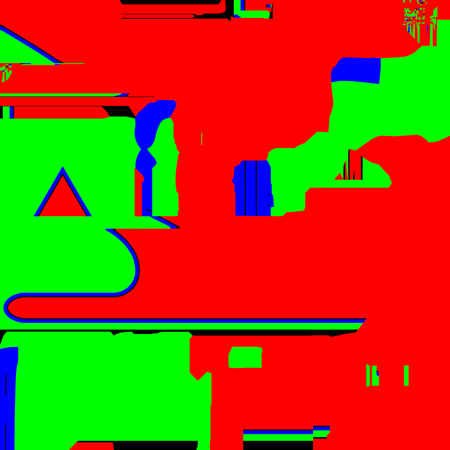
The rr/ld-f7 pack’s ATSF Warbonnet control texture, unwrapped across the F7A body’s UVs. Each solid region marks one channel’s zone; the game reads it as a distance field (below), not flat color, so rendered edges come out crisp rather than following these blocky boundaries.
Each channel is a signed distance field, not flat coverage: a smooth gradient through 0.5 at the zone boundary, brighter inside and darker outside, the same authoring as SDF text. This gives zone edges a crisp, antialiased boundary at any viewing distance. At each pixel, whichever zone (or the base) has the strongest signal wins outright; only the winner and runner-up blend, across a roughly one-pixel seam, so overlapping zones never muddy into a third color.
Because it’s a distance field rather than a coverage mask, thin stripes need to stay several texels wide to survive mip-mapping. A razor-thin pinstripe can fade out at a distance as the field’s peak drops below the 0.5 threshold. Set the base color close to the surrounding paint scheme so anything that does mip out fades gracefully instead of flashing a contrasting color.
Import settings: Unity’s defaults don’t suit a control texture.
- sRGB off — this is coverage data, not color, so it must import as linear.
- High Quality compression (BC7 where supported), not the default. Standard block compression quantizes in a way that shreds the SDF gradient and leaves rough, aliased zone edges.
- Keep the max size modest (Railroader’s own F7 maps ship at 1024) — compression quality matters far more than resolution here, and BC7 costs roughly double a standard format at the same size.
Wiring it up
Section titled “Wiring it up”Setting image/color1..3 in a style is only half the picture: something has to read the resolved style and push those values onto the material whenever it changes (model load, paint-scheme selection, or a color edit in the Customize window). Add the ready-made rr/PaintMapRendererGroup Script component to the same object as the RendererGroup it drives:
- Kind —
Script - Name — Paint Apply
- ScriptAsset —
rr/PaintMapRendererGroup - Parameters
styleClasses— 1 element array containing:Renderer.body
In plain terms: this repaints every RendererGroup carrying the Renderer.body style class, whenever the car’s style changes. Without it, the style’s image and color1–color3 are ignored and the zone shades with plain color.
The equivalent for an Image-content decal (a paint-mapped herald rather than a flat-color one) is rr/PaintMapDecal, with the same styleClasses parameter naming the decal’s style class(es). See The paint-map scripts for the parameter reference and where to read their source.
Full example
Section titled “Full example”Adapted from the rr/ld-f7 pack (EMD F7A), which ships several paint-mapped schemes. First, the RendererGroup and its paint-apply script on the car definition:
"components": { "body": { "kind": "RendererGroup", "styleClass": "body", "material": { "materialName": "Colorable" } }, "paint-apply": { "kind": "Script", "scriptAsset": "rr/PaintMapRendererGroup", "parameters": { "styleClasses": ["Renderer.body"] } }}Then a CarStyle definition supplying the control texture and zone colors:
{ "identifier": "rr/ld-f7a-gn-empire", "metadata": { "name": "Great Northern Empire Builder" }, "definition": { "kind": "CarStyle", "name": "Great Northern Empire Builder", "carIdentifiers": ["rr/ld-f7a"], "styles": { "Renderer.body": { "color": "metallic(F2F2FF, 0.5)", "color1": "FF540E", "color2": "3C3A1F", "color3": "E6BA23", "image": "./paintmap-f7a-gn-empire" } } }}carIdentifiers scopes this style to rr/ld-f7a specifically, rather than a carTypeFilter any locomotive could match. A control texture is authored against one model’s UVs, so it can’t be shared across different car geometry the way a flat color scheme can. See CarStyle and carIdentifiers.
The paint-map scripts
Section titled “The paint-map scripts”rr/PaintMapRendererGroup and rr/PaintMapDecal each take one parameter:
| Parameter | Type | Description |
|---|---|---|
styleClasses | array | Style selectors to drive (e.g. ["Renderer.body"]), one entry per RendererGroup or Decal this script repaints. Usually just one; add more only if a single script should coordinate several paint-mapped zones (e.g. body + underframe) on the same car. |
Both repaint on onModelLoad and whenever the car’s style changes, and both fall back to plain coloring (or, for a decal, hiding itself) when the resolved style has no image, so a car can mix paint-mapped and flat-color paint schemes across its CarStyle definitions with no extra branching in the component setup.
Both are thin wrappers around the imperative Material API (configure, setTexture, setColorParamsUsingStyle). Reach for that API directly only if you need paint-map-like behavior these two don’t cover.
They’re short enough to be worth reading, around forty lines each, plus the shared rr/PaintMap helper they both call to do the actual material work. All three ship with the game in:
Railroader_Data/StreamingAssets/AssetPacks/shared/Scripts/On macOS that path lives inside the app bundle, under Railroader.app/Contents/Resources/Data/. Read them freely, but don’t edit them in place: that folder is the game’s own content, and your changes would be replaced on the next update.
See also
Section titled “See also”- Colorable Components — the single-color
RendererGroupsetup this builds on - Styles — the selector/property system paint maps build on
- RendererGroup and Decal — the components a paint map colors
- Script — the component kind that attaches
rr/PaintMapRendererGroup/rr/PaintMapDecal - Shared Scripts — the other ready-made scripts in
rr/shared - Material — the lower-level Relay API these scripts are built on
© 2026 Giraffe Lab LLC. All rights reserved.